Persistent Volumes
Apps in Appliku run in containers with an ephemeral filesystem. Application data is not persisted across deploys and restarts — and this works just fine for most apps.
Data is usually stored in a database. For files, the scalable solution is S3-compatible services like AWS S3, DigitalOcean Spaces, etc.
But while S3 is a great solution for bigger apps, it is not convenient for spinning up a quick MVP or viable for some software that requires storing its data in persistent storage.
Volumes are persistent storage that is available for all processes within the app, stays between deploys and restarts, and can be exposed on a URL of your app.
Under the hood it uses Docker volumes pointing to a directory within your application directory (e.g., /home/app/app_name/volumes/volume_123).
Setting Up Volumes
You can add volumes by going to your app's settings, Volumes tab, and click "Add".
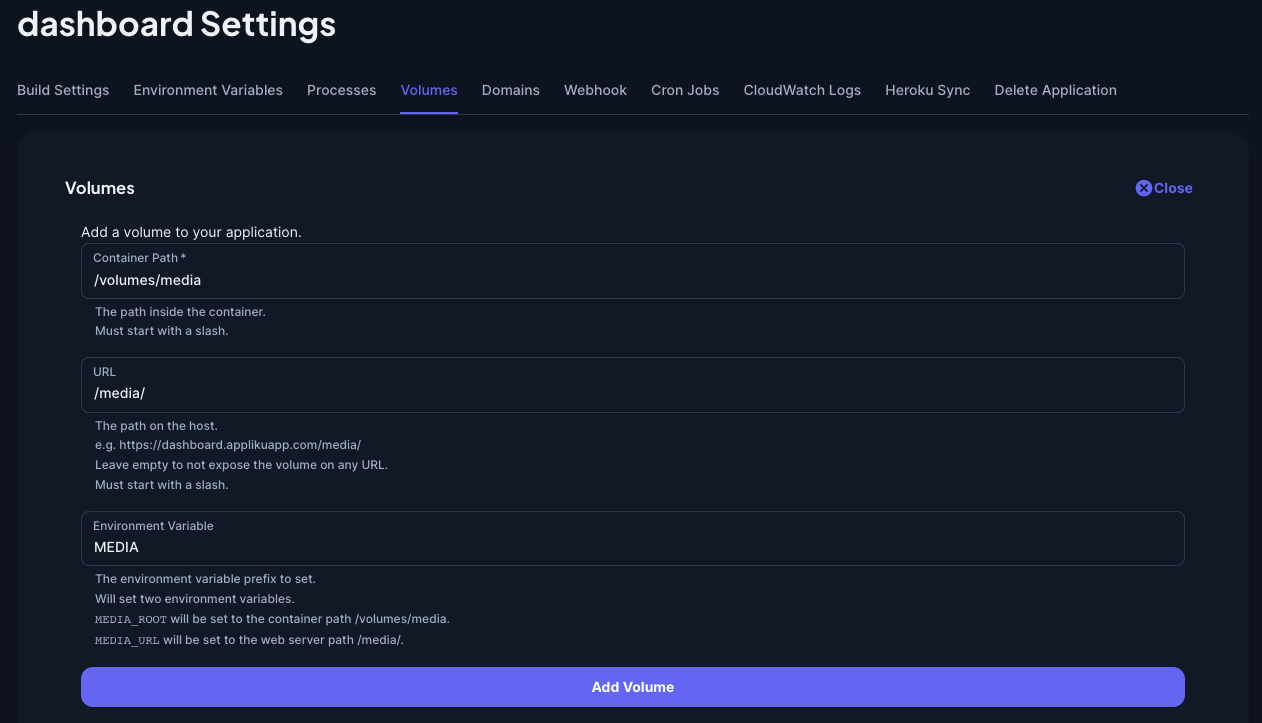
Container Path – the path on which the volume will be available for your running app. It can't be /code or just a slash /.
URL – optional parameter, a subpath on your app's URL where the directory will be exposed to all viewers. This is helpful if you want to store publicly available media files, uploaded by users (e.g., Django media folder).
Environment variable – an optional parameter that you can specify if you wish to pass the configuration of the paths to your app. Setting this parameter will create two environment variables within the app: one with suffix _ROOT and one with _URL suffix. E.g., setting the value of this parameter to MEDIA will create two environment variables MEDIA_ROOT and MEDIA_URL.
Application Considerations
You can create as many volumes as you need, make some of them available via Nginx and leave some of them private.
When you create, delete, or change parameters of any volumes you must deploy the app for it to take effect.
If you choose to expose the volume on a certain URL, make sure to enable "Update Nginx Configuration on deploy" checkbox on the "Build Settings" tab of app settings.

This checkbox will enable rewriting Nginx configuration for all the domains for your app on every deploy. Without enabling this checkbox, changes to volumes-related Nginx configuration will only be applied to newly added custom domains.
Environment variables set by volumes will override any existing ones that you set up in the "Environment Variables" tab during deployment, but won't delete them from that tab.
Upon deletion of a volume, its directory with files is not deleted from the disk.
How to Serve Media Files in Django via Nginx
In order to set up your Django project to use a volume for storing and serving media files you should:
- Create a volume with URL (
/media/) and environment variable set (MEDIA) - In Django project's
settings.pyfile specify two variables:
# with os module
import os
from pathlib import Path

BASE_DIR = Path(__file__).resolve().parent.parent

MEDIA_ROOT = os.environ.get('MEDIA_ROOT', BASE_DIR / 'media')
MEDIA_URL = os.environ.get('MEDIA_URL', '/media/')


# or with django-environ
from pathlib import Path
import environ

BASE_DIR = Path(__file__).resolve().parent.parent
MEDIA_ROOT = env('MEDIA_ROOT', default=BASE_DIR / 'media')
MEDIA_URL = env('MEDIA_URL', default='/media/')
Alternatively, you can hardcode paths to your media folder and the URL.